In my previous 2 posts I played around Linux Networking with the module iproute2.
- How to configure 1 Linux host with 2 NICs and 2 default gateways
- How to setup 2 network isolated Docker containers (front-end and back-end)
Now that pure routing is done, the next step is iptables, as a Firewall module.
I’ve to admit that coming from traditional networking it will be weird, but in this new context of Software Defined “Everything” and Clouds, it is important to get over with it.
I will try to make it as simple and short as possible. Then is on your side to go deeper if you want (netfilter, hooks, etc).
Let’s go!
New basic concept: Chains (flow directions) -> Tables (with rules) -> Targets (what to do after a rules was matched)
There are 5 tables and 5 chains to play with. The tables are fixed, but you can add User-defined chains (more on this later, spoiler alert Docker and libvirt).
So there will be a mix of 5 tables x 5 chains. This is the first pain point to grasp.
CHAINS
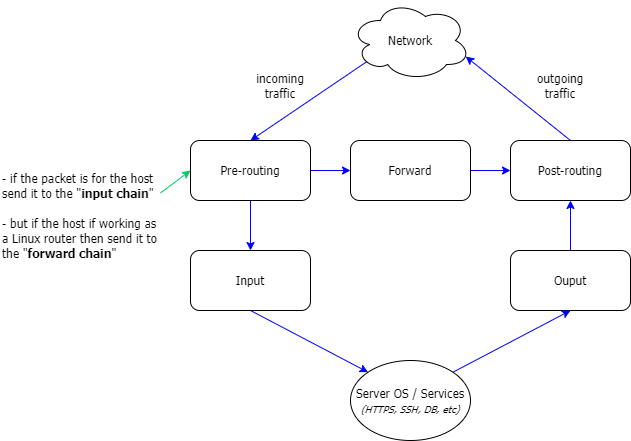
The traffic flow through the 5 chains: Pre-routing, Input, Forward, Output and Post-routing
Pay attention only to the pre-routing chain. Here it will be decided which path to follow.
TABLES
And the rules will be on the tables.
So, Firewall rules are organized in different tables, each one having an specific meaning:
- Filter: to filter traffic (src and des IP, TCP, UDP, etc)
- NAT: for address translation
- Mangle: to modify IP headers and optionally add a mark to the packet. That mark could be used in the following tables or chains as the packet goes through the stack. (This is what I mention in my previous posts about using marks to force routing instead of using the module iproute2, or in IPTables lingo to JUMP between chains)
- Raw: since IP tables is a stateful Firewall, at this table the connection tracking will take place. (if there is not a previous mark from the Mangle table)
- Security: It will add marks per packet or per connection. ONLY useful if you are in an SELinux environment.
Now, this is the tricky part, read slowly.
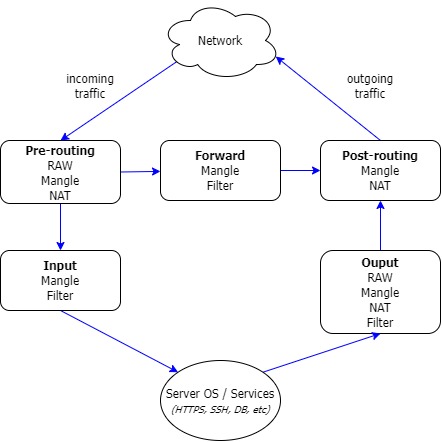
Each table have a dedicated section to each chain of the previous diagram (Pre-routing, Input, Forward, Output, Post-routing). Notice that not all tables have a portion in all chains.
Tables in chains, and rules in Tables will be evaluated from top to bottom.
Let’s update the diagram.
TARGETS
Apply to tables and they will dictate if the rule matching has to continue going down the table, or it has to exit to the next table or chain. Same effect as a DENY ALL in the middle of an ACL.
There are 2 kinds of targets.
- Terminating: accept, drop, reject, etc
- Non-terminating: log , trace, JUMP to another table, etc
Ok, let’s recap.
- A packet arrives to INPUT Chain (or any other chain)
- the rule matching start against the Tables
- after a matching rule, the Target will dictate what to do next: accept, drop, reject, jump, log, etc
Crazy IPTables
IPTables is huge topic, it wouldn’t fit not even in 5 posts.
So I will give you a glimpse of how crazy this could get. This is why for scale we need orchestration systems.
(At the bottom there are some basic tutorials for you to keep digging and learning)
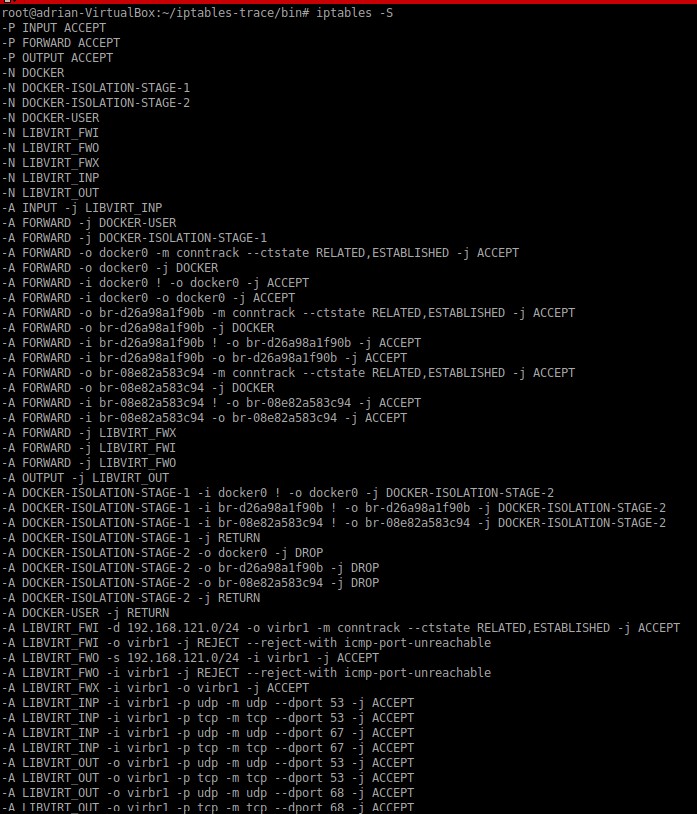
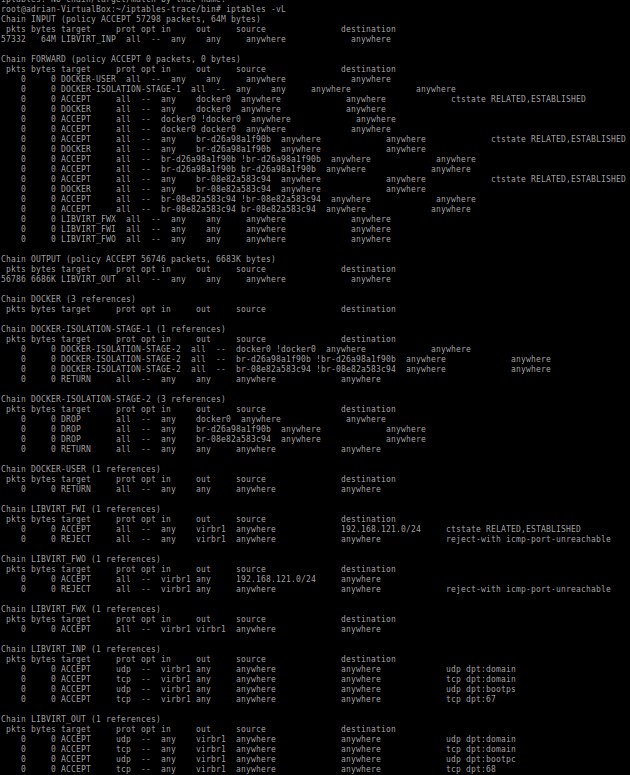
The following screen capture shows my LAB Linux, I have 1 Docker container and Vagrant with Libvirt.
All traffic is allowed, so if this already permits all, imagine when you start having specific rules :(
Try to follow the sequences with the simplest view with the full rules list, top to bottom, which includes chains, tables, and targets.
List rules (raw and mangle tables are not included)
List chains
More examples and tutorials
If you want to see more tutorials I recommend you to check this ones. There a lot of good examples:
How To Set Up a Firewall Using Iptables on Ubuntu 14.04
Iptables Essentials: Common Firewall Rules and Commands How To List and Delete Iptables Firewall Rules How To Set Up an Iptables Firewall to Protect Traffic Between your Servers An In-Depth Guide to iptables, the Linux Firewall
Maybe someday I will make another post on how to debug iptables.
Thanks and have fun with this monster! ;)